Silent Alarm for Businesses –
Discreet Emergency Help at the Push of a Button
Whether assault, escalation or threat situation – with IDERI note, employees alert silently and discreetly. In seconds. Without perpetrators or bystanders noticing.

+350k
employees protected worldwide by IDERI note
<3 s
delivery time of the silent alarm to all recipients
+ 20
years of experience in emergency alerting & IT security
100%
All-in-one solution
+350k users trust IDERI note


What is a Silent Alarm?
A silent alarm (also known as silent alert, personal emergency signal or panic button) is an emergency system that silently requests help in dangerous situations – without perpetrators or bystanders noticing.
Unlike acoustic alarms, the silent alarm makes no noise at the trigger point. Instead, predefined recipients – security service, supervisors or external control centers – are immediately informed while the on-site situation remains calm.
With IDERI note, the silent alarm is fully software-based and integrates into any existing Windows infrastructure – without expensive special cabling or third-party systems.
Acoustic Alarm
IDERI note
Perpetrator remains unaware
No escalation / panic
Targeted recipients
Criterion
Logging
Software-based (no renovation)
Is a silent alarm mandatory for businesses?
Under § 5 ArbSchG (German Occupational Health & Safety Act), all employers are required to conduct a risk assessment. For workplaces with customer contact, lone working or elevated violence risk, DGUV and professional trade associations explicitly recommend silent alerting measures. In industries such as banking, social services and public authorities, a silent alarm may be part of the legally required occupational safety standard. Non-compliance can result in fines of up to €25,000.
Silent Alarm via App, Button or Keyboard Shortcut
IDERI note combines all trigger methods in one system – choose the method that suits your workplace. A combination is always possible.

- Keyboard Shortcut
Fastest and most discreet. The alarm is triggered via a freely configurable keyboard shortcut on the PC – ideal for office workstations.
- Mobile App
iOS & Android: Silent alarm via smartphone – for mobile employees, field service and home office. Push reception included.

- USB-Button/Pedal
Physical alarm button at the workplace – discreetly mounted under the desk or at the counter. Ideal for reception and checkout.

- 3rd party / API
Automatic triggering via access control, alarm systems or monitoring systems – via REST API, SDK or PowerShell.
Silent Alarm via App or Button – which is better?
Both trigger methods have their strengths. The best solution combines both – exactly what IDERI note offers.
Hardware Button
(under desk / counter)
App Alert
(smartphone / tablet)
IDERI note
(all methods combined)
Trigerring
Physical button press
Tap on screen
Keyboard shortcut, button, API
Mobility
Criterion
Fixed location only
Anywhere with phone
Both combined
Installation
Hardware + cabling required
App Install only
Software-only, no renovation
False triggers
Risk if poorly placed
confirmation step possible
Configurable confirmation
Logging
Depends on system
Depends on app
Full audit-proof log
Integration
Standalone device
Via MDM/app
AD, REST-API, SDK
Ideal for
Counter, reception
Field service, home office
All workplaces combined
From Alarm to help – in under 30 seconds
IDERI note is ready to use immediately. The entire process – from triggering to coordinated response – takes place silently and within seconds.
- Alarm direkt auslösen: Mitarbeiter löst den stillen Alarm per Tastenkombination, USB-Button, Fußtaster oder IDERI note Mobile App aus – völlig unauffällig
- Empfänger alarmiert: Der Alarm erscheint sofort als Pop-up oder Vollbild bei vordefinierten Empfängern: Sicherheitsdienst, Führungskräfte oder externe Leitstellen.
- Koordinierte Reaktion: Empfänger quittieren den Alarm, koordinieren die Hilfe. Die Kommunikation läuft vollständig lautlos – keine Eskalation vor Ort.
- Automatische Protokoll: Alle Alarme werden mit Zeitstempel, Auslöser und Lesestatus protokolliert – revisionssicher für Nachweispflichten und Audits.
Silent Alarm across all Industries with security needs
Wherever employees work with customer contact or in lone working situations, IDERI note's silent alarm provides protection.

- Banking
Silent alarm at the teller counter, consultation room or entrance – discreet and panic-free during robbery situations.

Public Administration
Job centers, civic offices, social institutions: protection for employees during aggressive citizen interactions everywhere.

- Healthcare
Hospitals, care facilities, emergency rooms: quick assistance during patient assaults or emergencies directly on the screen.

- Retail
Checkout areas, shopping centers and stores: discreet alarm during theft or threats to staff.
School & Education
Teachers and school staff can discreetly trigger an alarm in extreme situations – without escalation in the classroom.

- Industry & Production
Lone working in warehouses or on company premises: protection and immediate alerting during accidents.
Silent Alarm on Your Smartphone Too
With IDERI note Mobile (iOS & Android), employees receive and send silent alarms anywhere – at home, in the field or on the go.
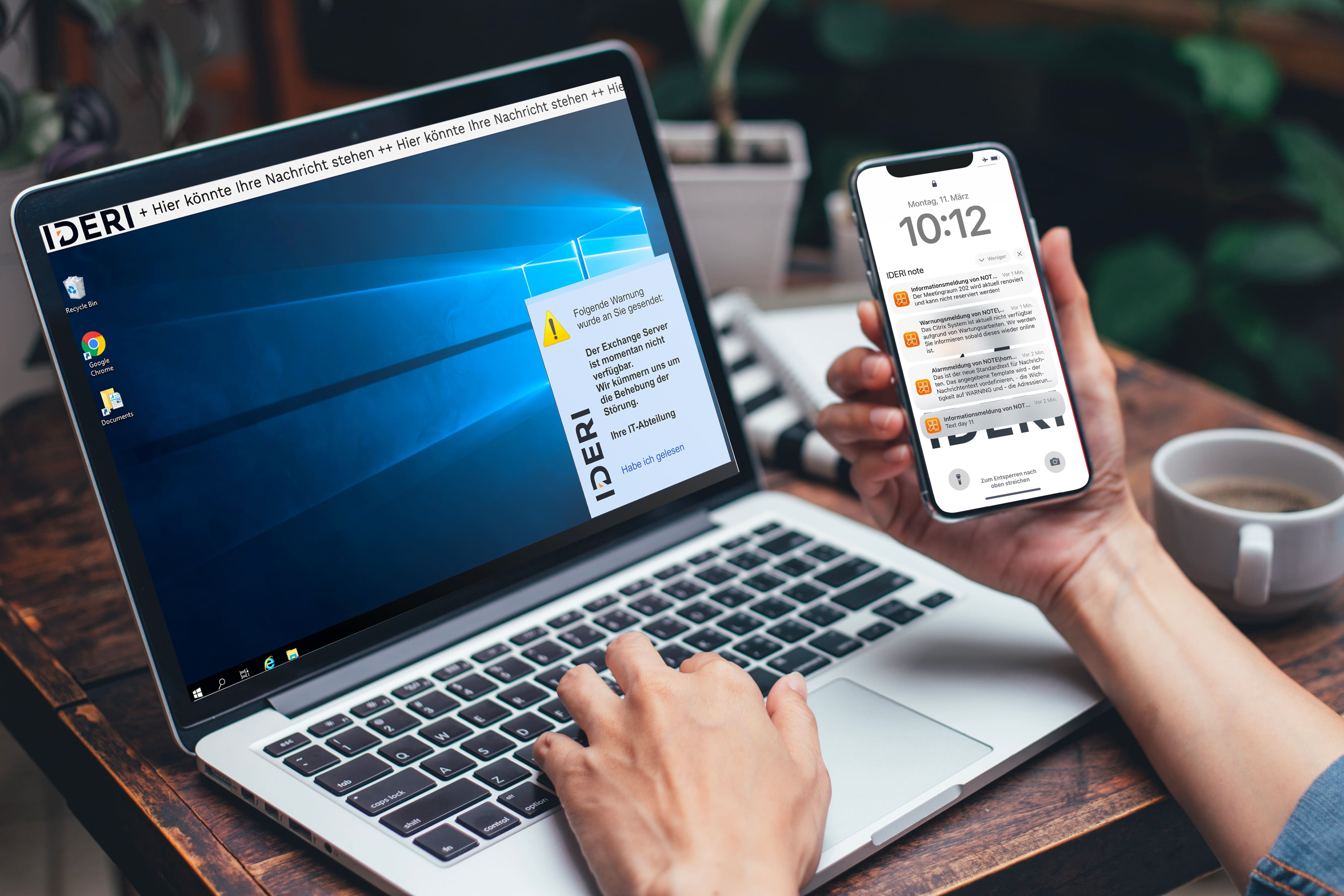
Stiller Alarm – Sicherheit für alle Beteiligten
Employee
Safety & Self-protection!
In a threatening situation, employees can quickly and discreetly call for help – without escalating the situation. This demonstrably strengthens the sense of security at the workplace.
Manager / Safety Officer
Control & Compliance!
Every alarm is logged with timestamp, trigger and response. Audit-proof, traceable and usable as evidence for risk assessments under § 5 ArbSchG.
IT Administrator
Easy Integration!
No infrastructure overhaul. IDERI note integrates into the existing Windows environment with Active Directory – ready within hours, no special cabling.
Silent Alarm with IDERI note – set it up now
Software-based, quick to integrate, no expensive hardware. Protect your employees today – try for free, no cancellation required.

Everything You Need to Know About Silent Alarms
Frequently asked questions
A silent alarm is a silent emergency system that is triggered discreetly in critical situations. Unlike conventional alarms, there are no acoustic signals or visual effects such as flashing lights. Instead, defined recipients – such as a security service, colleagues or external bodies – are discreetly informed while the on-site situation remains calm. This allows help to be summoned without potential perpetrators noticing.
Under § 5 ArbSchG (German Occupational Health & Safety Act), employers are required to conduct a risk assessment. For workplaces with customer contact or elevated violence risk, DGUV and professional trade associations explicitly recommend silent alerting measures. In industries such as banking, social services and public authorities, a silent alarm may be part of the legally required occupational safety standard. Non-compliance can result in fines of up to €25,000.
Both methods have their advantages: a hardware button (USB button or foot pedal) is always at hand and works even without a smartphone. The app offers mobility and is ideal for employees in the field or in home office. IDERI note supports both methods simultaneously – including keyboard shortcut and API integration. The best solution depends on your workplace situation. We are happy to advise you individually.
With IDERI note, the silent alarm is forwarded in under 3 seconds to all predefined recipients on the company network. Communication is local – independent of an internet connection.
IDERI note is purely software-based and requires no special hardware. The silent alarm can be triggered via keyboard shortcut (on existing PCs), optionally via a USB button or foot pedal (available from specialist retailers), or via the free mobile app (iOS & Android). No special cabling or renovation is required.
Yes. IDERI note offers a REST API, SDK and PowerShell integration to connect with existing alarm systems, access control systems or monitoring tools. Both directions are possible: IDERI note can receive alarm signals from third-party systems and trigger its own alarms in response.
Yes, with the IDERI note Mobile App (iOS & Android), employees in home office can receive silent alarms via push notification – as long as there is a mobile or internet connection. For desktop clients in VPN-connected home office environments, the full functionality is available as usual.
IDERI note includes 5 free Windows licenses and 2 mobile licenses with no time limit – ideal for testing or small teams. For larger environments (up to 50,000 clients per server), IDERI offers flexible licensing models on the concurrent-user principle. Ask for an offer now.
The silent alarm with IDERI note is used in banking and savings banks (robbery protection at the counter), healthcare (patient aggression, medical emergencies), public administration (aggressive citizens at counters), retail (theft, threats), schools (dangerous situations in the classroom) and industry (lone working protection). Basically any industry where employees work with customer contact or in isolated areas benefits from a silent alarm.
Ready to optimize your IT?
Get in touch with us for more information or to make a personalized request.